How to Connect Multiple AI Models Through One API
November 12, 2026 · 9 min read

GPT and Claude can use one SDK client, one API key, and one base URL: https://api.opencheap.si/v1. With OpenCheap’s OpenAI-compatible gateway, switching models starts with changing the request’s model value to an exact ID from /v1/models.
The catch? One API does not mean identical features. Token limits, tools, JSON output, and streaming need separate checks for each model.
This guide covers how to:
- Set up the key and send a first request with Python or curl.
- Verify model IDs and check supported settings.
- Test replies and streaming, then handle errors and incomplete output.
- Set request deadlines, bounded retries, and spending caps tracked in USD.
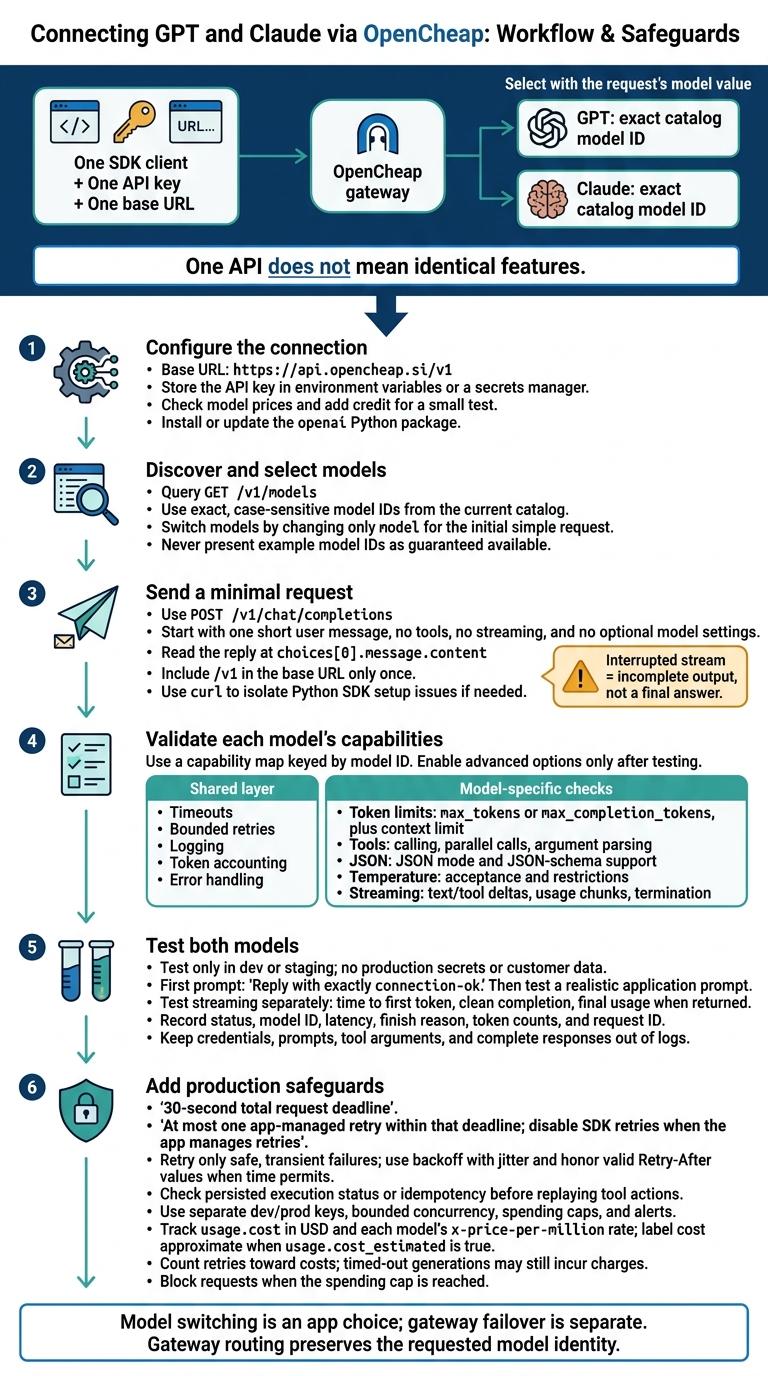
Connect GPT and Claude Through One API
Set Up OpenCheap and Send Your First Request
Prepare Your API Key, Balance, and Python Setup
Create an API key in the OpenCheap console, check the current model prices, and add enough credit for a small test. Use a current Python release and install the latest openai package.
Run these commands in your project folder. The activation command uses macOS/Linux; the comment shows the Windows PowerShell version.
python --version
python -m venv .venv
source .venv/bin/activate
# Windows PowerShell: .venv\Scripts\Activate.ps1

python -m pip install --upgrade openai
python -m pip show openai
Keep keys in environment variables, never in source or browser code. Revoke any leaked key immediately.
The Bash command below asks for your key without displaying it. Query /models first, then set OPENCHEAP_MODEL to an exact ID from the response. Use gpt-chat-latest only if it appears in your catalog.
read -r -s -p "OpenCheap API key: " OPENCHEAP_API_KEY
echo
export OPENCHEAP_API_KEY
export OPENCHEAP_BASE_URL="https://api.opencheap.si/v1"

curl "$OPENCHEAP_BASE_URL/models" \
  -H "Authorization: Bearer $OPENCHEAP_API_KEY"

# Use this only if it appears in your current catalog:
export OPENCHEAP_MODEL="gpt-chat-latest"
Create the Client and Call Chat Completions
Save the code below as first_request.py, then run python first_request.py in the same terminal.
Keep this first call simple: one short message, no tools, no streaming, and no optional model settings. The code prints the returned model, the assistant’s text, and usage data when available.
import os
from openai import OpenAI

client = OpenAI(
    api_key=os.environ["OPENCHEAP_API_KEY"],
    base_url=os.environ["OPENCHEAP_BASE_URL"],
)

response = client.chat.completions.create(
    model=os.environ["OPENCHEAP_MODEL"],
    messages=[
        {
            "role": "user",
            "content": "In one sentence, explain what an API gateway does.",
        }
    ],
)

print("Model:", response.model)
print("Reply:", response.choices[0].message.content)

if response.usage is not None:
    print("Usage:", response.usage.model_dump())
Test the Same Request With curl
Run this Bash command with the same environment variables to send the request without the Python SDK. This helps you isolate Python setup issues. When you use the SDK, it handles the authentication and JSON headers shown here.
curl --request POST "$OPENCHEAP_BASE_URL/chat/completions" \
  -H "Authorization: Bearer $OPENCHEAP_API_KEY" \
  -H "Content-Type: application/json" \
  --data "{
    \"model\": \"$OPENCHEAP_MODEL\",
    \"messages\": [
      {
        \"role\": \"user\",
        \"content\": \"In one sentence, explain what an API gateway does.\"
      }
    ]
  }"
The full request URL is https://api.opencheap.si/v1/chat/completions. Include /v1 in the base URL only once. Read the reply at choices[0].message.content.
A 401 or 403 points to an authentication issue. A 404 points to an incorrect base URL or model ID. Missing usage data alone does not mean the request failed. Once the request works, swap the model ID to test the other provider with the same payload.
sbb-itb-0a79850
Switch Models and Check Supported Features
Choose Exact GPT and Claude Model IDs
After your first request works, try a second model by changing only model. Use the exact id from /v1/models; IDs are case-sensitive. Leave the rest of the request unchanged unless a feature needs adjustment.
catalog = {
    model.id: model.model_dump()
    for model in client.models.list().data
}
MODEL_IDS = ("EXACT_GPT_ID", "EXACT_CLAUDE_ID")

for model_id in MODEL_IDS:
    if model_id not in catalog:
        raise ValueError(
            f"{model_id}: model not available through this gateway; "
            "select an exact ID from the current catalog."
        )

def ask_model(model_id: str, user_text: str):
    return client.chat.completions.create(
        model=model_id,
        messages=[{"role": "user", "content": user_text}],
    )

for model_id in MODEL_IDS:
    reply = ask_model(
        model_id, "Explain an API gateway in 20 words or fewer."
    )
    print(model_id, reply.model, reply.choices[0].message.content)
Once both IDs work, check which settings each model accepts.
Compare Shared and Model-Specific Settings
Keep timeouts, bounded retries, logging, token accounting, and error handling in one shared layer. Then validate token limits, tools, JSON output, reasoning controls, and streaming for each model.
Keep transport settings fixed while comparing the fields that vary by model.
| Request area | Shared behavior | Model-specific checks |
|---|---|---|
| Token limits | Use one application-level output budget. | Check whether the model expects max_tokens or max_completion_tokens, plus its context limit. |
| Tools | Reuse a normalized tool schema where supported. | Verify tool calling, parallel calls, and argument parsing. |
| JSON output | Validate results locally. | Check JSON mode and JSON-schema support separately. |
| Temperature | Keep the chosen setting in one place. | Verify acceptance and any restrictions for reasoning models. |
| Streaming | Reuse one event-processing layer where compatible. | Check text and tool deltas, usage chunks, and termination behavior. |
This split keeps model-specific checks separate from the shared request path.
Build Requests From a Model Capability Map
Use catalog metadata to build a guard for each model. That lets you reuse one request path and stop early when a setting isn't supported. The conservative builder below accepts only user-text requests and an output limit. Advanced features stay disabled until tested.
CAPABILITIES = {}

for model_id in MODEL_IDS:
    metadata = catalog[model_id]
    supported = set(metadata.get("supported_parameters") or [])
    token_field = next(
        (name for name in ("max_completion_tokens", "max_tokens")
         if name in supported),
        None,
    )
    CAPABILITIES[model_id] = {
        "supported_parameters": supported,
        "token_field": token_field,
        "max_output_tokens": metadata.get("max_output_tokens"),
        "input_modalities": set(
            (metadata.get("architecture") or {}).get("input_modalities") or []
        ),
        "allowed_options": set(),  # Enable only after feature tests.
    }

def build_request(model_id, user_text, output_token_budget, **options):
    caps = CAPABILITIES[model_id]
    if not isinstance(user_text, str):
        raise ValueError("This profile accepts plain text only.")
    if caps["input_modalities"] and "text" not in caps["input_modalities"]:
        raise ValueError("This profile accepts text-only requests.")
    if not caps["token_field"] or not caps["max_output_tokens"]:
        raise ValueError("Verify token settings before calling this model.")
    if not 0 < output_token_budget <= caps["max_output_tokens"]:
        raise ValueError("Output budget exceeds the verified limit.")
    unsupported = set(options) - caps["allowed_options"]
    if unsupported:
        raise ValueError(f"Unverified options: {sorted(unsupported)}")
    return {
        "model": model_id,
        "messages": [{"role": "user", "content": user_text}],
        caps["token_field"]: output_token_budget,
        **options,
    }
The same interface doesn't guarantee the same features. Unsupported fields may be rejected, ignored, or transformed. Before expanding this profile, test roles, content blocks, tools, JSON output, reasoning controls, modalities, stop conditions, and streaming independently.
Add tested fields to allowed_options with value validation. Check the finish reasons you receive, and treat unknown reasons as unknown - not success. Before the next request, verify the output budget and enforce the model's context limit with suitable token counting.
Test the Connection, Handle Errors, and Limit Costs
Test Both Models
Test only in dev or staging. Never use production secrets or customer data. Before enabling advanced settings, validate both models through the same guarded request path from the capability map.
Using the same client, send Reply with exactly connection-ok. to each exact model ID without streaming. Then test each with a realistic application prompt. Record the status, model ID, latency, finish reason, token counts, and request ID. Keep prompts, credentials, tool arguments, and complete responses out of logs.
Test streaming separately. Measure time to first token, confirm that the stream ends cleanly, and capture final usage if returned. If response caching is enabled, check x-klinn-cache for a hit, miss, or refresh.
Fix Common Errors and Understand Failover
When a request fails, use its status code to find the next step.
| Symptom | Likely cause | Fix |
|---|---|---|
401 or 403 |
Missing, invalid, expired, or unauthorized gateway key | Check secret loading, base URL, and key permissions. Don’t retry unchanged. |
Model not found or 404 |
Incorrect model identifier or endpoint | Check the exact ID against /v1/models. |
400 invalid request |
Unsupported parameter or incompatible schema | Remove optional fields and check the model’s capability map. |
| Context-length error | Input plus output allowance exceeds limits | Trim history or lower the output allowance. |
402 |
Balance used up, or a key or account spending limit reached | Top up or raise the limit. Don’t retry unchanged. |
429 |
Rate limit | Wait for the Retry-After, then retry. |
Timeout or 5xx |
Network, gateway, or provider failure | Retry only when safe and within the attempt and time budget. |
| Interrupted stream | Disconnect or upstream interruption | Treat the response as incomplete. Never use partial output as final. |
Model switching is an app choice; gateway failover is separate. OpenCheap’s routing preserves the requested model identity. When supported, it can fail over to an eligible backend before the first response byte. Record backend information when exposed, and test interruptions with harmless requests.
Set Timeouts, Retry Limits, and Spending Caps
For interactive requests, allow about 30 seconds for the first token, and more for the whole answer: long answers and reasoning models can take minutes. If your app manages retries, disable SDK retries and allow at most one retry within that time.
Use backoff with jitter and honor valid Retry-After values. If the wait exceeds the time left, return a controlled error instead. Before replaying a tool action, check its persisted execution status or idempotency key to avoid duplicate payments, messages, or writes.
Once requests work, lock down retry and spending limits. Use separate dev and prod keys, bounded concurrency, and spending caps. Set alerts before daily or monthly limits, and count retries in cost tracking: timed-out generations may still incur charges.
Track usage.cost in USD and each model’s x-price-per-million rate. usage.cost is what the request was charged. When a provider reports no token counts, OpenCheap counts them itself and sets usage.cost_estimated to true. Block requests when the cap is reached.
Conclusion: Check Your Multi-Model Setup
Once you’ve verified the client, key, base URL, and model IDs, your setup is complete. One OpenCheap gateway and one client can reach GPT and Claude by changing only model. Test tools, structured output, token limits, temperature, and stop settings separately.
Before sending production traffic, run through this checklist:
- [ ] Connection: Set the base URL to
https://api.opencheap.si/v1and store the key in an environment variable or secrets manager. - [ ] Both models: Confirm that the same client and key return a valid assistant reply for verified GPT and Claude model IDs.
- [ ] Shared settings: Check that the same client, key, formatting, timeouts, retries, and parsing work for both models.
- [ ] Capabilities: Use a capability map keyed by model ID, and leave out unsupported fields.
- [ ] Streaming: Confirm that both models stream without errors and that your app handles interruptions, timeouts, and partial outputs.
- [ ] Usage and budgets: Log the model ID, status, latency, token counts, and estimated cost in USD. Set caps, quotas, and alerts.
- [ ] Failures: Handle auth, validation, rate-limit, timeout, provider, and balance errors. Retry only transient failures, and log any fallback as an explicit app decision.
FAQs
How do I choose the best model for each task?
Use OpenCheap’s Models page to compare pricing per million tokens, context length, and supported modalities. In the console, compare model performance and costs.
Filter models by name or tags. “uncensored” indicates fewer content restrictions, while “decisions” models suit classification or automated tasks rather than general chat.
For faster responses, append :nitro to a model ID or sort by latency rather than cost.
What if a model’s capability metadata is missing?
Query /v1/models for the specific model ID to get the latest capability metadata. When available, this includes max_output_tokens, input_modalities, and supported_parameters.
If those fields are missing, OpenCheap doesn’t know them for that model. Test features such as structured outputs and tool calling yourself before relying on them.
How is my data handled across model providers?
OpenCheap does not save prompts or completions in its database or logs. For each request it keeps the time, key, model, token counts, price, how long it took, whether it succeeded, and any tags or metadata you send.
Optional caching may temporarily store answers in memory. Optional guardrails may process messages to check their content. Both are off unless you enable them.
The provider serving your request - and any additional provider used during failover - handles your data under its own terms.